
Cool Tabs allows you to view and download participants' photos and videos from your contest. Additionally, you have the option to automatically export them to your Dropbox account.
Below, we explain how to set up the export of content uploaded by your contest participants to Dropbox.
From the campaign editor, go to the "CRM Export" section and check the option "Save participants' photos/videos in my Dropbox account".
This way, when a user participates, the content they uploaded will be saved in a folder in your Dropbox account.
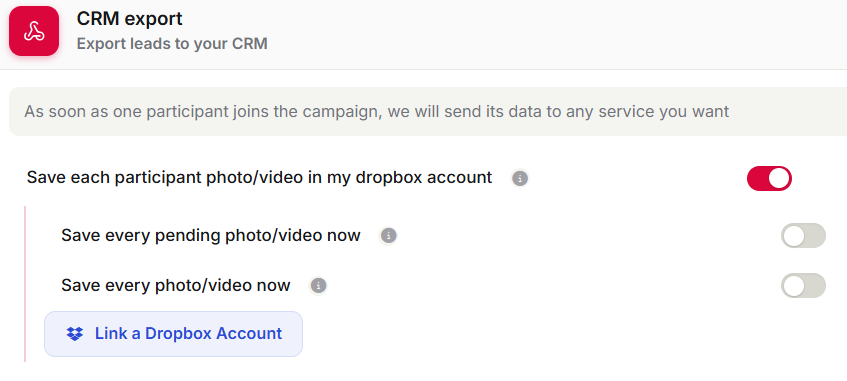
Select whether you want to save only the photos and videos that were uploaded successfully, or also those pending validation or that encountered an error.
Then, click on "Link a Dropbox account".
You will be asked to grant access to Cool Tabs. Once you accept, it will be linked to your Dropbox account.
Finally, save the changes made to the campaign.
If you have any questions, contact us at help@cool-tabs.com.
Related Content
How to create a photo contest.
How to view and download participants' photos.